If you’ve ever worked in legal, government, healthcare, or finance, you’ve almost certainly encountered the term PDF/A; but not everyone knows exactly what it means or why it matters. Whether you’re wondering what is PDF/A compliant, looking for a PDF/A example, or simply trying to understand the difference between a regular PDF and its archival cousin, this guide covers everything you need to know.
Let’s break it all down.
What Is PDF/A?
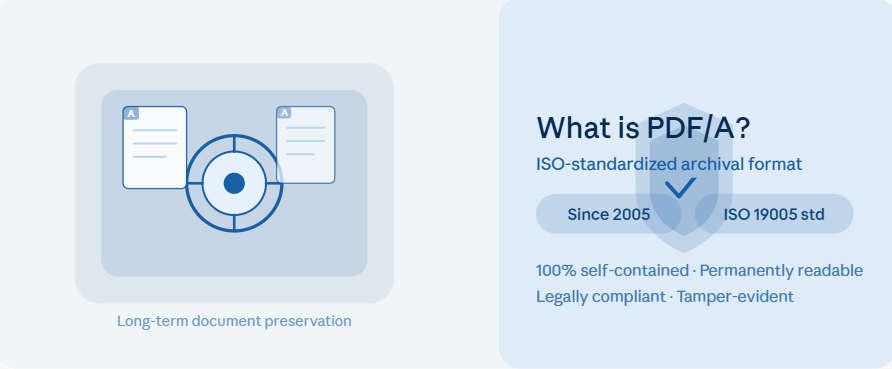
PDF/A is a specialized, ISO-standardized version of PDF (Portable Document Format) built specifically for long-term document preservation and archiving. The “A” stands for Archiving, and that single letter carries a lot of weight.
First released in 2005 and built on the PDF 1.4 specification, PDF/A was created to address a straightforward but critical problem: standard PDFs contain elements that may not render correctly, or at all, years down the line. External links break, embedded fonts go missing, dynamic content like JavaScript can behave differently depending on the viewing environment. PDF/A eliminates these uncertainties by requiring all necessary elements to be embedded directly inside the file itself.
The goal is simple: open a PDF/A file in 50 years, and it should look identical to how it looked the day it was saved.
What Is a PDF/A Compliant File?
Understanding what is PDF/A compliant is key to putting the format to use. A PDF/A compliant file meets all the requirements defined by the ISO 19005 standard. These requirements are both restrictive and constructive; they remove features that can degrade over time and mandate elements that ensure rock-solid reproducibility.
A truly compliant PDF/A file must:
- Have all fonts fully embedded within the file
- Use only permitted compression methods (ZIP and JPEG are allowed; LZW is not)
- Contain no JavaScript, audio, or video content (with limited exceptions in newer versions)
- Not be encrypted or password-protected
- Store metadata using the Extensible Metadata Platform (XMP) standard
- Not reference any external links or content dependencies
- Not use XFA (XML Forms Architecture) forms
- Include appearance dictionaries for all interactive form fields
The result is a document that is 100% self-contained. Everything needed to display it correctly is bundled inside, with no reliance on external systems, fonts, or services.
PDF/A Standards and Conformance Levels Explained
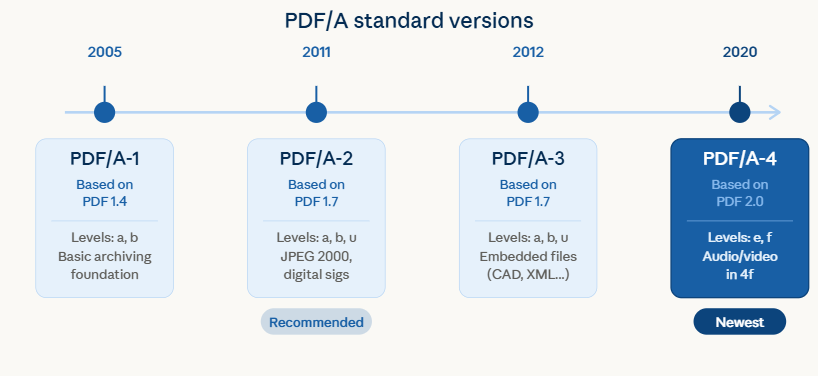
One area where people often get confused about PDF/A is the variety of sub-versions. There are currently four main PDF/A standards (PDF/A-1, PDF/A-2, PDF/A-3, and PDF/A-4) each offering different capabilities. Within those standards, conformance levels determine how strictly the requirements must be met.
PDF/A-1
The original standard is based on PDF 1.4. It comes in two conformance levels: Level A (full accessibility compliance, including tagged structure and Unicode mapping) and Level B (basic visual reliability without full accessibility requirements). For most archiving needs, PDF/A-1b is the most practical starting point.
PDF/A-2
Based on PDF 1.7, this version adds support for JPEG 2000 compression, digital signatures (PAdES), optional content, and transparent objects. PDF/A-2b is the most widely recommended conformance level for organizations starting their archiving journey today.
PDF/A-3
Functionally similar to PDF/A-2, but with one major addition: it allows arbitrary file types (such as CAD drawings or XML data files) to be embedded as attachments. This makes PDF/A-3 popular in industries like engineering, finance, and government.
PDF/A-4
The newest addition to the family, based on PDF 2.0, with enhanced support for digital signatures (4e) and file attachments (4f, which also allows embedded audio and video). PDF/A-4 is still gaining adoption, but represents the direction of the standard.
A Real-World PDF/A Example
To make this more concrete, here is a practical PDF/A example: imagine a government agency that needs to archive a signed long-term contract for 25 years. If they save it as a standard PDF, the fonts might not be embedded, the digital signature’s visual appearance could differ across viewing platforms, and any links in the document might eventually break.
Save the same document as a PDF/A-2b file, and all of that is resolved. The fonts are embedded, the visual appearance is locked in, and the digital signature is preserved in a legally compliant way. Open it in 2050 on any PDF/A-compliant viewer, and it will look exactly as it did when signed.
This is why sectors like law, finance, healthcare, and government rely so heavily on the format.
PDF/A vs. TIFF: Why PDF/A Wins for Modern Archiving
Before PDF/A came along, TIFF (Tagged Image File Format) was the dominant standard for digital document archiving. And while TIFF is still used today, PDF/A offers several meaningful advantages.
Since TIFF is a raster image format, it captures a document as a fixed image, which means no searchable text, no vector graphics, and no ability to include metadata or digital signatures natively. To extract text from a TIFF archive, you need OCR software, and even then, accuracy is never guaranteed.
PDF/A, by contrast, can preserve vector graphics, searchable Unicode text, embedded metadata, and legally recognized digital signatures, all in a single self-contained file. This makes PDF/A the preferred choice internationally, with organizations including the US Supreme Court and various EU governments either recommending or mandating it for official electronic filings and archives.
Additionally, PDF/A files with embedded fonts and vector content can actually be smaller than equivalent TIFF files, which matters when you’re archiving millions of documents.
Who Uses PDF/A and Why?
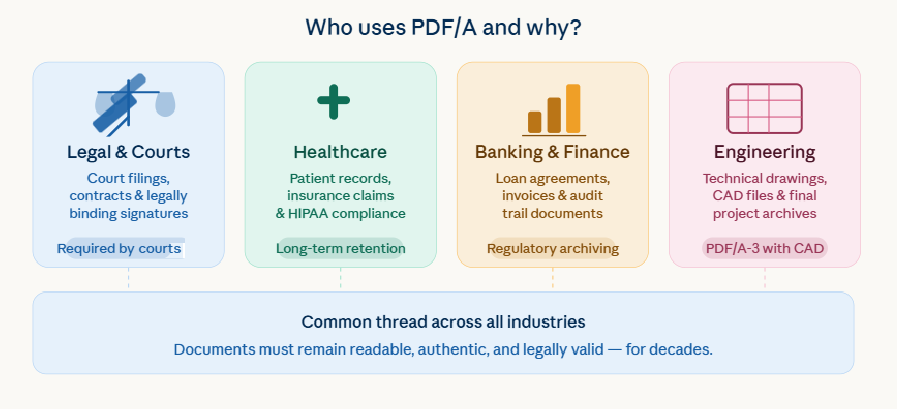
PDF/A has been adopted across a diverse range of industries, each with distinct use cases:
Government & Legal
Courts, regulatory bodies, and law firms use PDF/A to maintain admissible, tamper-evident records. For example, in the US, the Supreme Court requires electronically submitted documents to be in PDF/A format. Digital signatures embedded in PDF/A files carry legal binding force.
Healthcare & Insurance
Patient records, insurance policies, and claims documents require long-term retention with precise reproducibility. PDF/A ensures these records remain readable and searchable decades later, critical for compliance with regulations like HIPAA.
Banking & Finance
Financial institutions archive terms of service, loan agreements, and transaction records. PDF/A enables full-text search across archived documents, improving operational efficiency and regulatory compliance.
Engineering & Construction
Architecture and engineering firms use PDF/A (particularly PDF/A-3) to archive final technical drawings alongside embedded CAD source files, ensuring project documentation remains accessible and version-controlled long after project completion.
PDF/A Validation: Why It Matters
PDF/A validation is the process of confirming that a file genuinely meets the requirements of the chosen PDF/A standard. This is not optional, especially if your documents will be placed in a long-term digital archive or submitted to a regulatory body.
At a minimum, validation should occur when creating a PDF/A file and again before placing it in a permanent archive. Some business workflows require additional validation checks throughout the document lifecycle.
PDF/A Limitations Worth Knowing
No format is perfect, and PDF/A comes with a few genuine trade-offs. The strict requirements mean that certain features available in standard PDFs are off-limits. You cannot encrypt a PDF/A file. Dynamic content, JavaScript, and most embedded media are prohibited in earlier versions. And not every PDF viewer on the market supports all sub-versions of the standard equally, which can create compatibility headaches.
There’s also a common misconception that simply saving a document as PDF/A is enough. In reality, true compliance requires validation, the process that checks the file against the ISO specification and produces a detailed report. A document that looks correct visually may still fail a proper validation test.
How MS Technology Supports PDF/A
MS Technology has supported the PDF/A format since the very beginning. From our current HTML5 Angular eViewer v7, PDF/A viewing has remained a core part of what we deliver. Our document viewer renders all major PDF/A variants accurately, giving your users a consistent, reliable experience regardless of which sub-version they’re working with.
Beyond viewing, our SDKs and MST Batch Converter enable organizations to convert existing documents to PDF/A at scale, perfect for archiving, compliance initiatives, digital transformation projects, or government archiving requirements. Whether you need to process a handful of files or manage high-volume batch conversions, we have the tools to support your workflow.
If you’d like to explore how MS Technology can help your organization implement or improve its PDF/A archiving strategy, reach out to our team to schedule a technical discussion.
Final Thoughts
Understanding what is PDF/A, and putting that understanding into practice is increasingly important in a world where digital records are expected to last decades. Whether you’re a developer building document workflows, a compliance officer managing regulatory requirements, or an IT administrator evaluating archiving strategies, PDF/A gives you a reliable, internationally recognized foundation to build on.
The format isn’t perfect, and knowing its limitations is just as important as appreciating its strengths. But for organizations that need to preserve documents faithfully and indefinitely, PDF/A remains the gold standard.

Share This Article